
On Google Play (formerly PureStream for YouTube)

Skip the noise.
Keep your time.

Streamlined skips the sponsor reads, channel plugs and like-and-subscribe asks it finds inside YouTube videos on Android. Chapters take you straight to the part you want.

For Android, on top of the YouTube app. The phone art is illustrative. See real screens.
Time saved

What is your time worth?

Sponsor reads, promos and subscribe asks take a minute here, a minute there. Across everything you watch, they add up. Streamlined skips the ones it finds, so more of your time goes to the video you chose.

Measured
6h 27ma month, test-group average

Our test group saved an average of 6 hours 27 minutes a month. Your results will vary with what you watch and your settings.

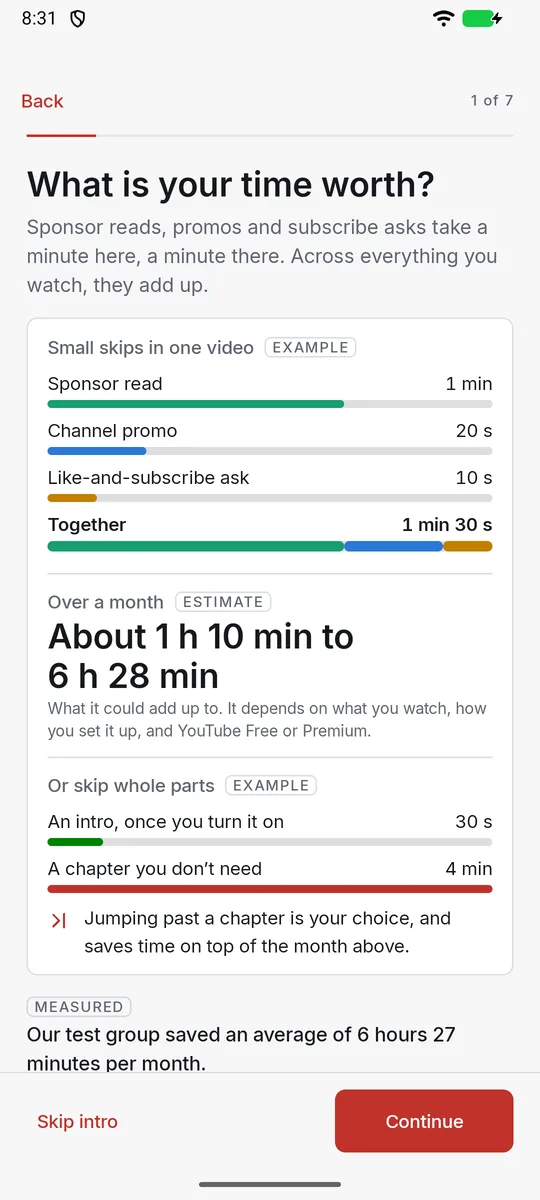
Small skips in one videoExample
  • Sponsor read1 min
  • Channel promo20 s
  • Like-and-subscribe ask10 s
  • Together1 min 30 s

Example times from the app’s setup screen, showing how small skips add up.

How it works

Keep watching the way you do. We handle the rest.

  1. Keep the YouTube app

    Streamlined works on top of the YouTube app on Android, with YouTube Free or Premium.

  2. Choose what to skip

    Set sponsor reads, channel plugs, like-and-subscribe asks, intros, endings and more to Off, Ask or Auto.

  3. Move by chapter

    Open Chapters to jump to the part you want. Optional ad skipping presses YouTube’s Skip button when it appears.

Automatic skipping

Skip the parts you didn’t choose to watch

Set each kind of section to Off, Ask or Auto. Auto skips it and a short notice tells you what went. Ask offers a Skip button first.

Choose what to skip

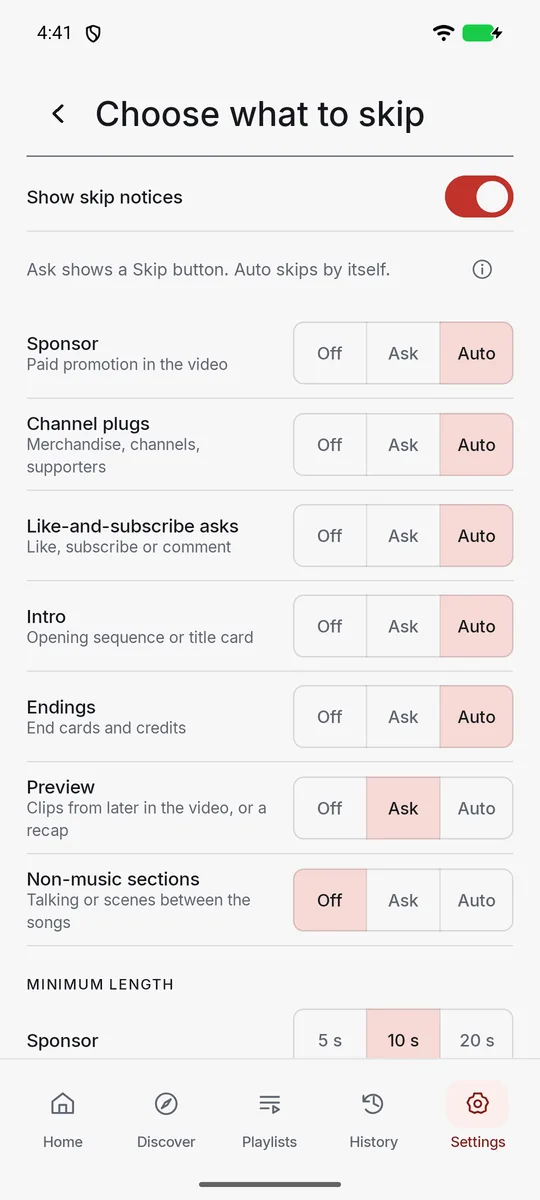
Ask shows a Skip button. Auto skips by itself.

Sponsor
Channel plugs
Like-and-subscribe asks
Intro
Endings
Skip ads when YouTube offers itPresses YouTube’s own Skip button. Never blocks, mutes or hides an advert. Needs YouTube screen access, then turn it on.
30 s of sections skipped in this play-throughRecreation
Illustrative demo. Available skips vary by video, and some sections may be missed. Optional ad skipping presses YouTube’s Skip button when it appears. Example footage: Sintel, © copyright Blender Foundation | durian.blender.org, CC BY 3.0. Short excerpts, cropped, resized and muted; the sponsor, plug and ad cards are ours. Film credits.
Chapters

Move by chapter, straight from YouTube

See every chapter of the video playing and tap one to jump straight to it. When a whole part isn’t for you, one tap moves past it.

  • Open it with Chapters on the Streamlined bar. The arrow shrinks it to the chapter playing, and the X closes it.
  • Next and previous on compatible headphones or a Bluetooth car kit move by chapter while the bar runs.
  • No chapters? Streamlined can usually make them in a few minutes, though not for songs or very short videos.

Illustrative demo. Real recordings follow in the next section.

Chapters

From the running app

Real screens, recorded on Android

Real captures of a Streamlined 1.1.0 test build on an Android emulator, trimmed and resized only.

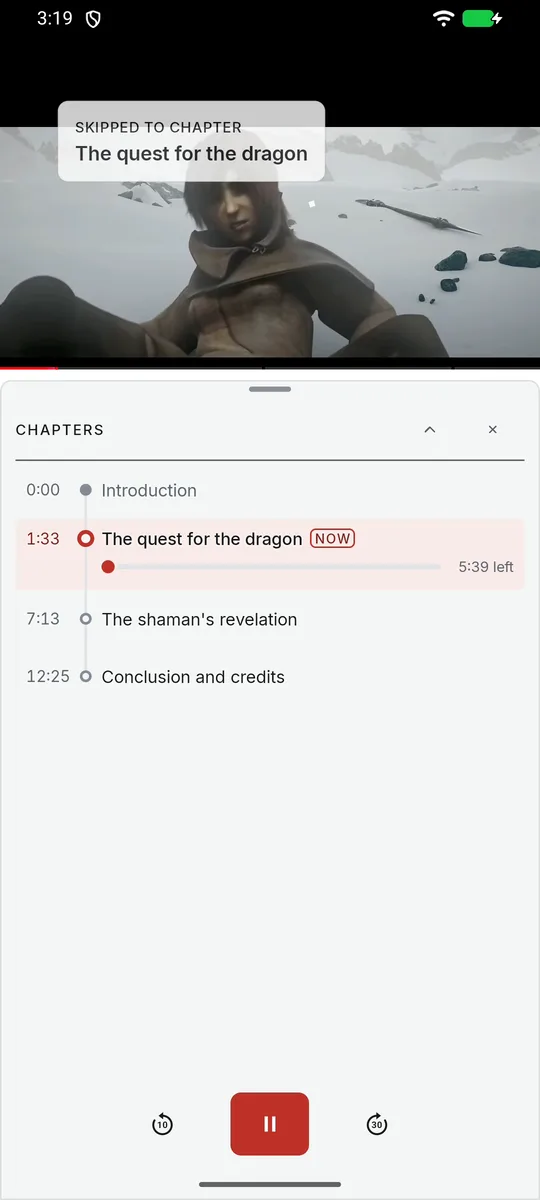
Screen recording · 9 sA tap on The quest for the dragon in the Chapters box. The video jumps, the notice reads Skipped to chapter, and the row is marked Now. No sound. Sintel, © Blender Foundation (blender.org), CC BY 3.0, played from YouTube.
  • Streamlined setup, step 1 of 7, titled What is your time worth. Example skips in one video add up to 1 min 30 s, a monthly estimate of about 1 h 10 min to 6 h 28 min, and the measured line: Our test group saved an average of 6 hours 27 minutes per month.
    Setup: What is your time worth?The app labels its figures Example, Estimate and Measured.
  • Settings, Choose what to skip. Show skip notices is on. Sponsor, Channel plugs, Like-and-subscribe asks, Intro and Endings are set to Auto, Preview to Ask and Non-music sections to Off, with minimum lengths below.
    Choose what to skipIntro and Endings were switched to Auto for this capture; after setup they start Off.
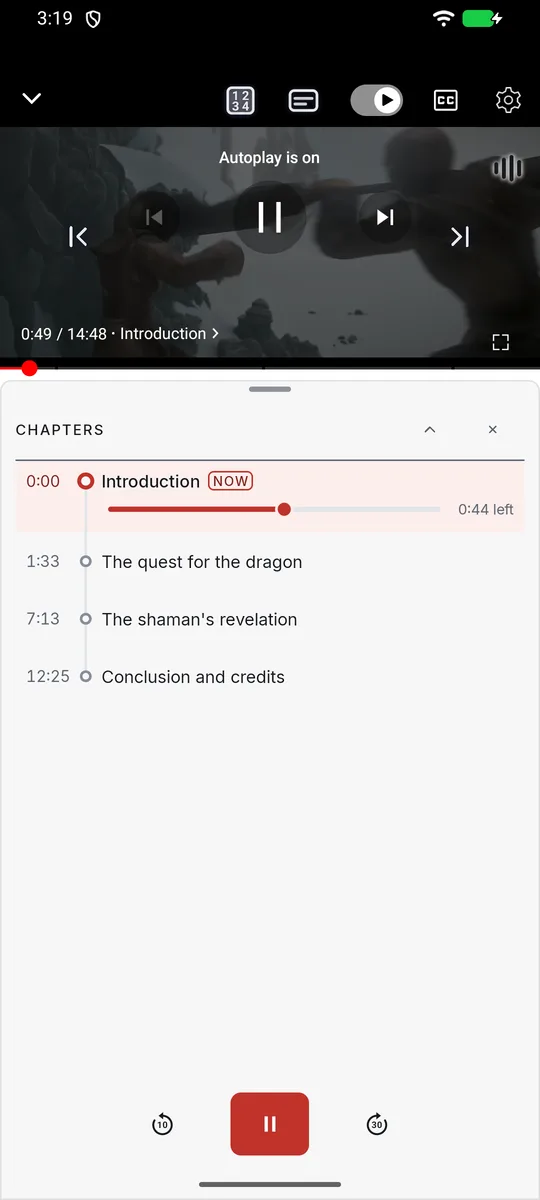
  • Sintel playing in YouTube with the Streamlined Chapters box below: Introduction marked Now with 0:44 left, then The quest for the dragon, The shaman’s revelation and Conclusion and credits.
    The Chapters box over YouTubeVideo: Sintel, © Blender Foundation, CC BY 3.0.
  • After a tap on The quest for the dragon, a notice at the top left of the video reads Skipped to chapter, The quest for the dragon, and the box marks it Now with 5:39 left.
    Skipped to chapterA chapter tap, not an automatic skip.
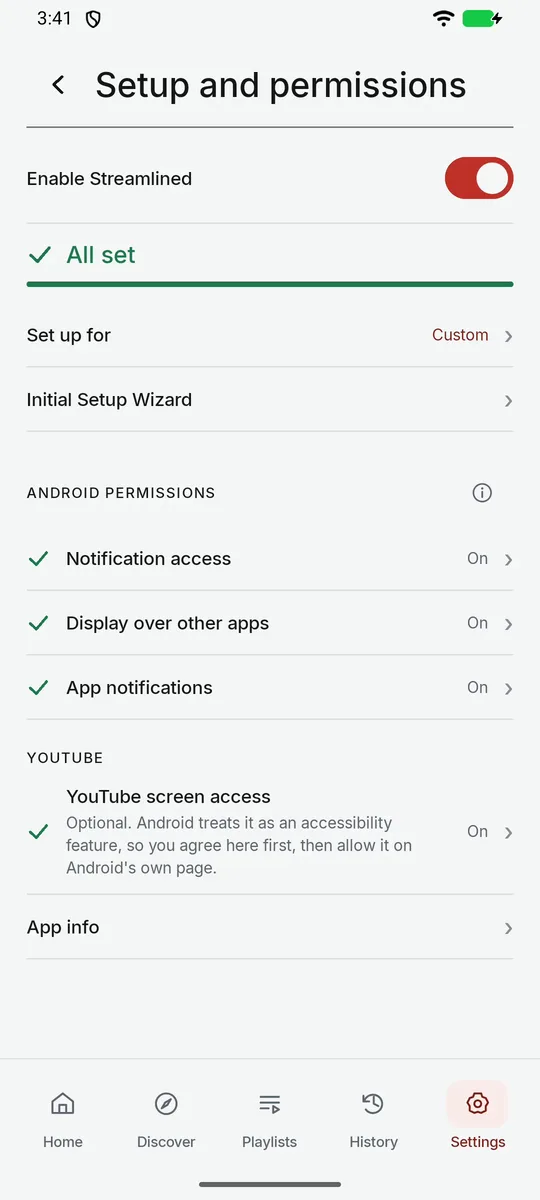
  • Settings, Setup and permissions. Enable Streamlined is on and reads All set. Notification access, Display over other apps and App notifications are On, and the optional YouTube screen access is On.
    Setup and permissions: All setYouTube screen access is optional.

Not recorded yet: an automatic skip, the Time skipped card, Stats and landscape viewing. That is why the skipping demo above is a recreation.

Also in the app

Captions and lyrics, on top of YouTube

Lyrics for songs, captions for talk. These are illustrative demos, not recordings. Captions that show who is speaking (Captions+) appear only on videos that already have captions.

Captions and Speaker display concept

The same three-person conversation, side by side.
CaptionsIllustrative
Plain lines. A >> marks a new speaker, but not who it is.
Speaker display conceptConcept onlyMayaJonPriya
Text size: medium
Names, colours and a side of the screen for each speaker, plus a timeline of who talked when.

Lyrics and Lyric timing concept

The same song, side by side.
LyricsIllustrative
Community lyrics can have split words, stray tags and loose timing.
Lyric timing conceptConcept only
Cleaned-up lyrics, synced word by word as they are sung.
Different products. Different capabilities.

Choose your screen

Android

Approved for the Streamlined release. Google Play still shows our former listing text until the next store update.

Streamlined: Skip Ads & Promos

Chapterised videos. Auto-skip ads, promos, intros & subscribe now segments

Works alongside the official YouTube app on Android.

View Google Play listing
Web

Streamlined Air

A separate web podcast player hosted at air.purestreamapp.com. An account is required.

Open Air web player

Compare every Streamlined product

A note from us

Hi, we are Nigel and Shaya

We built the tool we wanted for our own viewing: less time handling interruptions, more control over the part we chose to watch.

Streamlined comes from Nigel and Shaya at S6 Studios in Adelaide. It is a practical tool, not a promise of better focus or health.

Thank you for being here and helping us improve it.

Nigel and ShayaS6 Studios, Adelaide, Australia
Current availability

Start with the existing Android listing

Streamlined Plus is not on sale.

Streamlined Plus

Not on sale. There is nothing to buy and no trial.

Check Google Play for current access.

View Google Play listing

Questions

How it works

Does this block YouTube ads?

No. Streamlined never blocks, mutes or hides ads. Optional ad skipping presses YouTube’s Skip button when it appears, so ads YouTube won’t let you skip still play. Separately, Streamlined skips sections inside videos, such as sponsor reads, based on your settings.

How does Streamlined know what to skip?

It brings together what is already known about a video: the creator’s chapters, timestamps in the description, captions, and what your phone spots while you watch. Our S6 Spectra service tidies all of that into chapters and skippable sections, then shares the result, so the next person watching the same video gets it sooner. A brand-new video can take a few minutes, and the results can sometimes be wrong.

Many sources in, one clean feed out

What do Off, Ask and Auto mean?

Auto skips by itself, and a short notice says what was skipped. Ask shows a Skip button first. Off leaves it playing. Sponsors under 10 s and like-and-subscribe asks under 5 s are left playing by default, and you can change both lengths.

Will it skip every sponsor in every video?

No. Available skips vary by video, and some sections may be missed. A brand-new video can take a few minutes.

What are chapters for?

Chapters show a video’s parts so you can jump to the one you want, from the Chapters box or compatible headphone and car buttons. If a video has none, Streamlined can usually make them in a few minutes, though not for songs or very short videos.

Getting started

How much time will I save?

Our test group saved an average of 6 hours 27 minutes a month. Your results will vary with what you watch and your settings. Ads are never counted as time saved, and it is not a guarantee.

Do I need YouTube Premium?

No. Chapters and the skips inside videos work with YouTube Free and Premium. Listening with the screen off depends on your YouTube plan.

Which Android devices work?

Check the Google Play listing for your device and region. Not every phone, tablet, headset or car is supported.

Why does Google Play say PureStream?

Streamlined was formerly called PureStream. The Google Play listing still uses the earlier name and package ID (com.s6studios.purestream.yt) until the next store update.

Is there an iOS version?

Not of this app. Streamlined for iOS is a separate listening and viewing app, still in development, with nothing to install yet. The Android skipping features do not carry over.

Can I buy Plus?

Not yet. Plus is not on sale, and there is no paid offer on this website.

What permissions and data are involved?

Setup asks Android for notification access, display over other apps and app notifications. YouTube screen access is optional, but ad skipping needs it. Setup help explains each one. See the app's privacy policy.

Is Streamlined made by YouTube?

No. It is an independent app from S6 Studios Pty Ltd, not affiliated with or endorsed by YouTube or Google.

Watch what matters. Skip what doesn’t.

Get Streamlined on Google Play (currently listed under our former name, PureStream for YouTube).

Get it onGoogle Play